Posts

Showing posts with the label sharepoint

Custom Script in SharePoint Online Revisited

The PnP community has become a valuable resource for documentation, sample code, and overall collaboration for all things Microsoft. If you've worked with Office/Microsoft 365, odds are that you've bumped into at least one community-driven component. Here are a few examples: Modern Script Editor SPFx web part that allows the embedding custom html/js/css into a modern page. PnP Modern Search Set of web parts that allow a more customized search experience, which fills some of the gaps left by the highlighted content out-of-the-box web part. Additional background here . Custom list view header One of the many example json styles for customizing content rendering in SharePoint. In this case, it sets a static, customized header instead of the default view header. List formatting has many samples to showcase different customization options. In the meantime, Microsoft is on track to add a few new things, while shutting down a few others. Microsoft has announced deprecations for older...

Breaking down document locking in SharePoint

Image
This is a topic I've been meaning to discuss in a while. We open, change and close documents almost every day, and sometimes we collaborate with other people at the same time on those documents. SharePoint brings all co-authoring features we need, straight out-of-the-box, but sometimes, there are problems. While things are starting to look better on the cloud side, the concept of document locking is still very much up-to-date and understanding how it works and what to do when things go wrong is crucial. In an article that has since disappeared the Microsoft Knowledge Base (but still available here ), Microsoft explains it best: When a document is opened by a client program, Windows SharePoint Services puts a write lock on the document on the server. The write lock times out after 10 minutes. Users cannot modify the document during the time when the document is locked. In a scenario where the program that opens the document unexpectedly quits or crashes and you try to open the do...

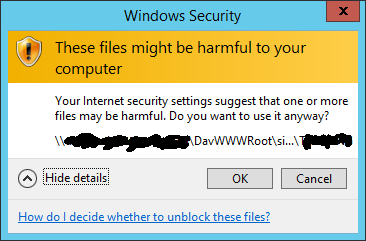
Harmful warning when copying/moving between webdav sites and libraries

Image
Problem Sometimes, when copying or moving documents between mapped libraries in SharePoint (whether they are network drives or just opened temporarily) we get the Windows Security warning: "These files might be harmful to your computer". This message is specially strange since the site already belongs to the Local Intranet Zone . Solution What we need to do is add the path "\\your-sharepoint-site" to the local intranet zone, save and log off and re-sign in. Internally, this change will add a file entry to the zones in the registry. Therefore, a way to perform this trough a .reg file, is: Windows Registry Editor Version 5.00 [HKEY_CURRENT_USER\Software\Policies\Microsoft\Windows\CurrentVersion\Internet Settings\ZoneMap\Domains\domain.com\*.subdomain] "http"=dword:00000001 "https"=dword:00000001 "file"=dword:00000001 After adding this key and signing off or restarting, the warning no longer appears.

Open Office documents in any browser using Office URI scheme

Image
Problem: One of the problems when shifting to a non-IE browser in SharePoint, is that immediately documents start downloading instead of opening in the browser. While we can overcome that by tweaking the "Open in browser" library option, sometimes it is just very difficult to interact with Office since we cannot call "CoreInvoke" or functions such as createNewDocumentWithProgIDEx from the SharePoint OpenDocuments Class (OWSSUPP.DLL), often ending up with error message, The document could not be opened for editing. A Microsoft SharePoint Foundation compatible application could not be found to edit the document. One possible scenario could be: How to open an instance of a .dotx Word Document Template in Google Chrome and allow a suggested save location? Solution: Starting SharePoint 2013 and Office 2010 SP2, we can use URI schemes, which are basically URLs starting with "ms-X" which trigger the desktop application to open, and works in both IE and ...

Document ID not being generated

Image
Problem In a scenario where we have many document Content Types, we may want to enable Document ID - aka "Permanent Links" - which is a feature in SharePoint that assigns a specific ID for each document. That ID never changes even if the document is renamed or moved to another location. In this scenario, the Document ID field was being generated for some libraries/content types, but not others, which is a surprisingly common problem. Background There are several stages we need to go through to enable use this mechanism. Stage 1 We enable the feature in the Site Collection Features. Stage 2 Under Site Collection Administration > Document ID Settings, we need to enable the assignment and pick a prefix. The IDs use the format: PREFIX-LISTID-LISTITEMID ( ref ) Where: PREFIX: the preconfigured prefix for the site collection, which can be any set of numbers and letters between 4-12 characters LISTID: the property docid_msft_hier_listid of the list...

SharePoint and the magic of query strings

One of typical requests from users is the ability to have a page open in a certain state, where things automagically appear and happen by themselves. Throughout my travels, I have come by many of these magic strings of text that we put into the url bar and something amazing happens, some of these not even accessible - at least easily - through the user interface. My goal with this post is to lay down some of these bad boys, who they are and what they do. Old but gold, open the "Web Part Page Maintenance" Query: ?contents=1 Result: opens a page with all the web part instances, effectively allowing us to manage (close, delete, etc.) web parts and very useful to troubleshoot problematic web parts Go into the current page's edit mode If - for whatever reason - you need to open a page in edit mode, you can add this one. Query: ?ToolPaneView=2 Result: page opens automatically in edit mode Open a view in quick edit mode We can open up a view already in qui...

Using bookmarklets to instantly export webparts and other abilities

Image
I've recently bumped into a blog post with mention of a tool that would convert a piece of JavaScript (that you would otherwise store in the server on in the browser through user scripts) to a bookmark ! This way, whenever you want to run a big chunk of code in your browser that would affect the currently opened website, you can simply push a button and off you go. This is known as a "bookmarklet". "A bookmarklet is a bookmark stored in a web browser that contains JavaScript commands that add new features to the browser." The concept is simple: Develop a script that would add some function to the existing website (but will be executed on demand instead) Go to the Bookmarkleter page to convert the script Drag-and-drop the bookmark (or create it yourself) with the new "link" Examples of SharePoint bookmarklets: My very own " SPDevTools " This script will inject several buttons near the SharePoint ribbon with several func...

SharePoint | Value cannot be null, parameter name: g

Image
Problem: Moving documents in SharePoint can be a difficult task at times. One of the biggest challenges is keeping previous document versions. In some cases, it works if you simply move the documents from one place to the other, while using explorer views (nb: only works for MOVE operation, not for COPY). In other cases, explorer view, site content and structure and even 3rd party tools will fail to accomplish this. One of the reasons - and the one explained in this post - is a problematic field schema. More specifically, the lack of a certain attribute on a certain type of field, that will prevent the operation from running successfully, resulting in screens such as the ones below.             http://.../Demo Document 001.docx: Value cannot be null. Parameter name: g     Solution: In this case, it appears that we have a field with type "User", which does NOT have the attribute "List" set to "UserInfo...

Ultimate Debugging Enabler for SharePoint

Image
Synopsys On every new environment we often need to enabling custom errors, debug mode and other settings that will make your development environment spit-up all the exception in a human readable way. What we don't usually we know is that, not only can be disable CustomErrors for SharePoint sites - just as we would for any .NET application - but there are also other things that we may need to take into considering in order to end up seeing something different than this: Solution Although we can see many different methods describing what, where and how to prepare an environment for debugging, the truth is that this procedure is not easy or straight-forward, and there doesn't seem to be a single place with all this information. - different methods (CallStack, Debug, CustomErrors, AllowPageLevelTrace, Trace) - different locations (IIS web.config, Template\Layouts, Template\Admin) My proposal is to run a simple PowerShell script that will easily enable all the debuggin...

Using FontAwesome as an icon framework

When customizing the look and feel of a website, we often want to use specific, intuitive icons. In some cases - such as content management platforms - these icons are already there, but they may not make sense for many reasons: not completely meaningful color does not match the site design not flexible enough Wouldn't it be great is there was a lightweight solution we could use, that doesn't involve any script, of even custom images?! Well, there is. I have been using FontAwesome for a while now and I can say it is pretty impressive: 100% CSS (no images, or scripts) Supports IE8+ and other browsers Its an icon framework with 500+ icons Provides a consistent icon set Supports features such as custom size, mouse over color, animated icons, rotation, etc. Its free! Now, the idea is that you embed, in your html, a tag with your markup. e.g. Here's a breakdown: fa provides common icon styles fa-camera-retro specifies the icon to be used fa-3x en...

SharePoint | An "Open with Explorer" tale

Image
Problem: I started this mini-project saying to myself: If I work with Firefox, why can't I get "Open with Explorer". Soon I realized that I was in way over head. SharePoint's tight coupling to Internet Explorer, on top of security mechanisms of the web, make trying this a bumpy road. After many attempts failed, I eventually gave up, but not before I defined a workaround, which would allow me to have something similar, not "one-click" but almost... Solution: Some post-attempt observations: - Trying to re-use the "built-in" functionality quickly seems to be a showstopper. - Trying to call an URL with file:// seems to have worked in the past, but due to new browser security mechanisms, it no longer works 1. Install grease monkey https://addons.mozilla.org/pt-PT/firefox/addon/greasemonkey/ 2. Add a script Click "New user script..." from the Grease Monkey context menu. 3. Include jQuery http://stackoverflow.com/question...

SharePoint PowerShell start script on steroids

I work with SharePoint, and I work with PowerShell. PowerShell scripts can easily become messy and unstructured, hard to troubleshoot. The same concepts as "regular" programming apply: helper methods/functions, encapsulation, abstraction, etc. But the main purpose of PowerShell is still, to automate things that otherwise would take loooooong time to do manually. With time, I came up with a starter script for every usage, generic enough to allow me to start doing specific stuff right away, while taking advantage of nice snippets of code. I'm not trying to solve any outstanding issues or represent any best practices, just sharing what is for me a life saver, due to the following: - Ever wanted to be able to click "run" (double-click) and don't care if you bump into permissions issues, or remember to " run as administrator "? - If the script crashes , you know exactly why, when and where, and you can also ensure objects are still disposed ...

SharePoint | Leveraging data management options

In SharePoint, there are many options and APIs to move, copy, duplicate, export content from one place to the other. Common scenarios involve performing tasks such as archiving, back-ups, or related actions that require fetching information from a source and sending it over to a destination. This post enumerates a few of those options, along with their benefits and caveats. Content Database Context: Multiple Site Collections (.bak) One of the most common means of backing up and/or migrating content is using the whole database. Databases store pretty much all the content of one or more sites, and they are our best option for reproducing content, while maintaining all the integrity of the source. Backups can be created by copying the physical .mdf and .log.mdf files, or by exporting the database into a .bak file. This is a brief example procedure for backing up a content database: In SQL Server Management Studio, right-click the content database, choose Tasks, Backup ...

SharePoint | Broken List Views / ECB

Problem: - Clicking a list view ECB (Edit Control Block) often causes This item is no longer available. it may have been deleted by another user. click ok to refresh the page. - List View Web Part often causes Unable to display this webpart. Correlation ID: xxx (UI) or Error while executing web part System.StackOverflowException Operation caused a stack overflow.    at Microsoft.Xslt.NativeMethod.CheckForSufficientStack() (log) Solution: It appears that list views need to load within 1 second, otherwise SharePoint will block them from loading due to a timeout. SPFarm.XsltTransformTimeOut "Specifies the seconds that a customized XSLT transformation is allowed to run. " This property is editable with PowerShell: $farm = Get-SPFarm $farm.XsltTransformTimeOut = 5 $farm.Update() http://msdn.microsoft.com/en-us/library/microsoft.sharepoint.administration.spfarm.xslttransformtimeout%28v=office.15%29.aspx http://sharepoint.stackexchange.com/questions/205...

SharePoint | Read-only stories from the field

Image
Problem: On of the most common problems I have encountered among end-users, yet with incredible variable cause, is without doubt the dreadful "Read-Only" message we get while opening documents. Identification: There are multiple possible operations users try to accomplish that may cause this. Most will result on one or more of the following bahaviour: - Word will open with the message near the title of the document [Read-Only] - The save disk icon does not contain the arrows (as below), but a flat disk alone -You may get "The file [filename] has been modified by [domain\user] on [date]" or "The URL [filename] is invalid. It may refer to a nonexistent file or folder , or refer to a vlid file or folder that is not in the current web". - You may get "Message from webpage: The document could not be opened for editing" " A Microsoft SharePoint Foundation compatible application could not be found to edit the documen...
