Posts

Showing posts with the label Office

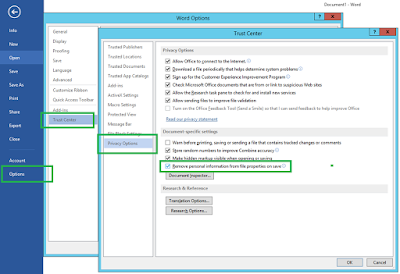
Programatically uncheck the option to remove personal information
Image
Problem Office documents have a setting to remove personal information each time the document is saved. If you have track changes and people commenting for example, their names get removed and replaced by a generic "Author" name. This is sort of a security setting that it's nice to have, most in most cases it gets enabled unintentionally when using the Document Inspector to clean-up documents. While we can simply open up the trust settings and disable this, there might be times when we need to go over a substantial amount of documents and manual work is no longer effective. At the same time, this is a good proof of concept should we want to start automating other things on Office documents. While OpenXML seems to be a clear successor, the Interop Objects still allows us today to interact and manipulate Word documents, in writable Visual Studio C# applications. Where we can do something as easy as doc.RemovePersonalInformation = false Solution

Easily access linked files in Word/Office

Image
Problem: With the constant changes in the Office User Interface, it's gets increasingly difficult to find things. One feature that I am particularly annoyed about is the linked files. Whenever a user has a document with links to external documents, I never seem to find how to manage them. Solution: As usual, the complete list of commands comes to the rescue. Simply by going to File > Options > Quick Access Toolbar, we can see a list with commands, and if we pick "All commands", we will now find " Edit Links to Files " and bring it to the right for a quick shortcut on the top left.

Open applications as another user

Problem: Sometimes we need to run an application such as an Office App (Word, Excel, SharePoint Designer) as another user. For most Office Apps, the "Run As..." context menu does not appear and there doesn't seem to be a way to log off and on from the Office user. Although there is an old utility that allows this, we not always remember it. Solution:  A solution is to log off and log on as the other user . Then we can in fact use the same machine to test an application using a different user. However, an even better solution is to simply run a command line utility : - Open CMD - Go to the path where the application lives - run "runas /user: domain \ username application .exe", replacing the bold fields by your information e.g. C:\Program Files (x86)\Microsoft Office\Office14>runas /user:mydomain\tduarte SPDESIGN.EXE

Outlook 2007 | Contact folder not appearing in new mail form

Image
Backing up contacts and emails resulted in contact subfolders not appearing when I selected the "New" email, on the address book list. The solution was to edit the properties of each contact folder and enabling the checkbox "Show this folder as an e-mail Address Book" in "Outlook Address Book" tab.

Office 2007 | Save files as PDF

Add-on to make "Save As" option enabled for PDF and XPS files http://www.microsoft.com/downloads/details.aspx?FamilyID=4d951911-3e7e-4ae6-b059-a2e79ed87041&displaylang=en